Wearable alarm or smartphone app for lone worker protection
Choosing the right safety net for a lone worker
When a person works alone, the main question is simple: if something goes wrong, can they raise an alert quickly, and can someone respond with enough information? A wearable alarm and a smartphone app can both support that aim, but they do it in different ways. The better choice depends on the work setting, the hazards present, and how reliable a phone is during a shift.
A wearable alarm is built around an SOS button, automatic alerts such as man down or fall detection, and voice communication through a dedicated device. A smartphone app uses the phone as the control point, often combining an SOS function with location data and voice or messaging alerts. Both options can fit a lone worker policy, provided the workplace understands where each one works well and where it has limits.
What a wearable alarm brings to the shift
A dedicated lone worker alarm is useful when the worker needs a clear, physical way to call for help. A button on a device can be easier to press than finding a phone in a pocket, especially if the person is stressed, injured, wearing gloves, or carrying tools. Devices designed for workplace protection may include SOS, GPS, two way voice alarm capability, man down alerts and fall detection alerts, depending on the model and service.
The advantage is focus. A wearable device has one job. It does not rely on the worker unlocking a phone, opening an app, or finding a stable mobile data connection before an alert can be sent. In places where a phone may be tucked away, covered by clothing, or left in a vehicle, a wearable device stays with the person.
Two way voice communication can matter as much as the alert itself. An alert tells an alert recipient that something may be wrong. Voice contact can help confirm whether the worker is safe, what has happened, and what response is appropriate. In a lone worker setting, that reduces guesswork and helps avoid both under-reaction and unnecessary escalation.
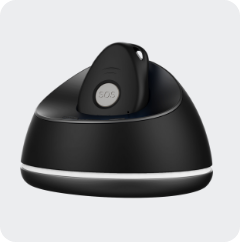
Automatic alerts are another reason some workplaces favour dedicated devices. Man down detection can flag a person who has stopped moving in a concerning way. Fall detection can raise an alert after a fall. These features are not a substitute for sound workplace safety practice, but they add a layer of protection when a worker cannot press a button.
Where a smartphone app can fit
A smartphone app can be a practical option where workers already carry a phone, the site has dependable coverage, and the risks are relatively predictable. For someone moving between offices, client sites, or low risk outdoor tasks, the phone is already close at hand. An app can provide an SOS function, location information, and a route for alerts to reach a nominated contact or monitoring service.
Apps can also be easier to roll out when a workplace wants a familiar interface. Many workers know how to use a phone quickly, and updates can be managed through the normal device process. That can suit teams with mixed roles, where only some staff face higher risk tasks and a separate device would be hard to justify.
The trade-off is dependence. A phone needs charge, signal, and the app running in a usable state. Battery life becomes part of the safety plan, particularly on long shifts or in cold conditions. Coverage may vary in basements, remote yards, rural properties, or behind dense structures. Location accuracy can also shift between GPS, WiFi positioning, and GSM triangulation, which may affect how precisely an alert recipient can identify where the worker is.
Comparing the options side by side
The strongest comparison is not simply dedicated device versus phone. It is about how quickly an alert can be raised, how much useful information travels with it, and whether two way voice communication is available when needed. A wearable alarm tends to be stronger on immediate access, automatic detection, and consistent placement on the person. A smartphone app tends to be stronger on convenience and flexibility, especially where the phone is already part of daily work.
For higher risk lone work, such as tasks with a chance of a fall, a collision, or a medical event, dedicated devices often align better with the duty of care. SOS, GPS, man down and fall detection alerts give the alert recipient a clearer starting point. Two way voice alarm capability can then help confirm the situation before a response is arranged.
For lower risk work, an app may be enough if the workplace has checked coverage, set clear response expectations, and built the app into its workplace policy. The key is to treat the phone as safety equipment during the shift, not as a personal item that happens to have an app installed.
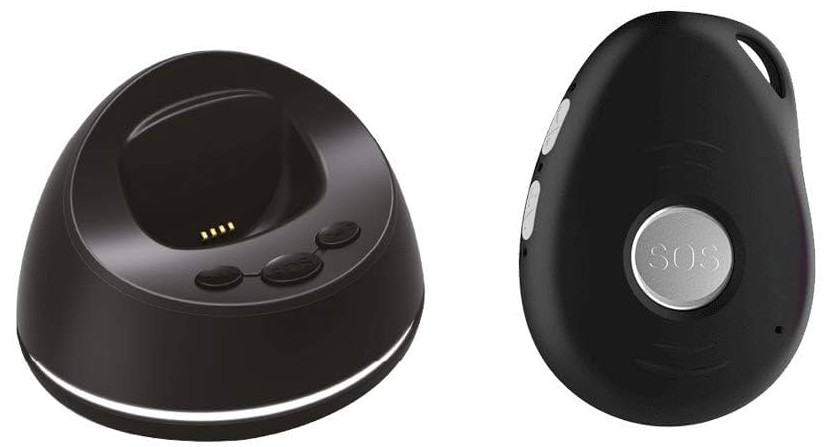
Some workplaces use both approaches. A worker may carry a phone for normal communication and wear an alarm for emergency alerts. This can work well where voice contact and location sharing need more than one route, or where staff move between very different environments during the same day.
Questions to ask before choosing
Start with the work itself. Is the worker stationary or moving? Are they inside, outside, or in areas with poor signal? Could a fall leave them unable to reach a phone? Do they need hands free operation? Would a device be practical with gloves, uniforms, or protective clothing? These details shape the choice more than a feature list alone.
Next, look at the alert path. Who receives the SOS, and what happens after an alert arrives? Is there a clear escalation process if the first contact does not answer? Does the system support voice communication, so the worker and alert recipient can speak? How is location shown, and what happens if location data is delayed or less precise?
Device testing should be part of the decision. A short trial in real work conditions can reveal issues that are not obvious on paper, such as signal gaps, confusing buttons, poor audio, or a device that is uncomfortable to wear. The same applies to an app. Check whether it keeps working as expected when the phone is locked, low on charge, or moving between coverage areas.
Workplace policy also needs to match the tool. Workers should know when to raise an alert, what to do if an alert fails, and who is responsible for responding. A safety tool is only useful if the people involved understand the process around it.
Making the decision practical
Wearable devices for safer shifts suit roles where immediate access, automatic alerts, and voice contact carry the most weight. They are often a better fit for lone work with physical risk, remote locations, or situations where a worker may be unable to reach a phone. A dedicated alarm also keeps the safety function separate from calls, messages, and other phone distractions.
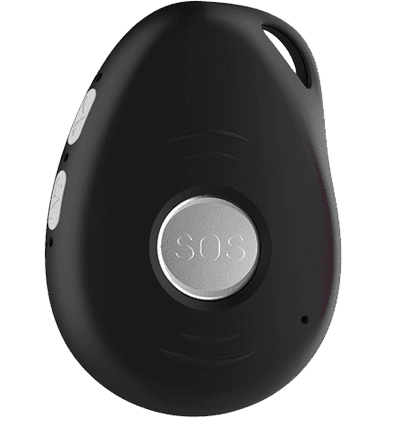
Smartphone apps suit roles where the phone is reliable, coverage is known, and the main need is a simple SOS path with location information. They can be a sensible layer of protection when risks are lower and the work pattern changes often. The limits around battery life and signal should be addressed in the workplace policy rather than left to chance.
For many New Zealand workplaces, the decision comes down to the level of risk and the need for dependable two way voice alarm contact. Where an alert must lead to a quick, informed response, a wearable alarm with SOS, GPS, man down and fall detection alerts offers a more purpose built approach. Where convenience and flexibility matter most, an app can still play a useful role if its limits are understood and managed.
Either way, the aim is the same: a worker who can call for help, an alert recipient who receives enough detail, and a response process that everyone understands before the shift begins.